Training budgets across Kenya are spent on sessions, yet the attendance record that proves a session happened is often the weakest document in the file.
That matters for FMCG, retail and modern trade, consumer durables, and cosmetics teams, where promoters and merchandisers need training that can be shown, not just claimed.
This post explains how a field learning platform handles attendance differently for classroom, in-store, virtual, and e-learning sessions.
It also covers how those records appear to the employee on a phone and to the training head in reports.

Why Paper Registers Fail the Audit
A signature on a printed sheet shows that someone held a pen. It says little about whether that person stayed, learned, or was even in the room.
Take a beverage distributor running a product briefing for 40 promoters across Nairobi and Kisumu, with registers collected afterwards.
Six sheets come back late, three signatures look alike, and nobody can say which promoters learned the new range before the December rush.
When a manager asks who was trained, the training team has to reconstruct the answer from memory and phone calls.
One Attendance Rule for Each Session Type
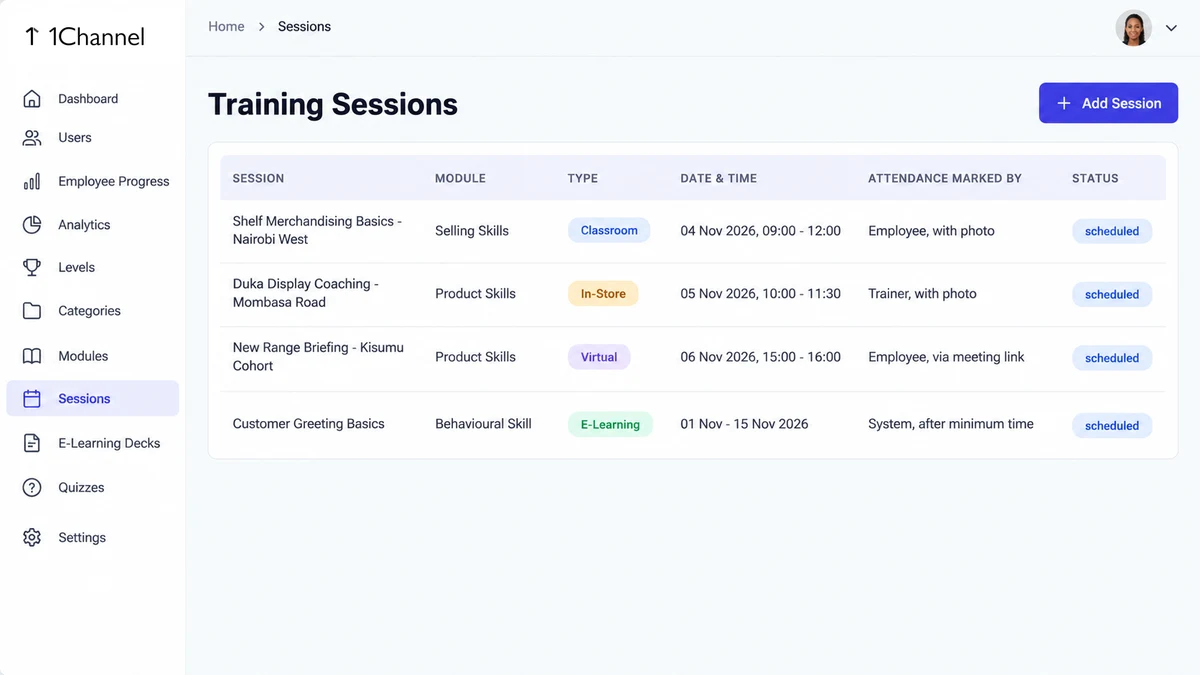
Attendance does not work the same way for every kind of training, so the platform applies a different rule to each of the four session types.
An admin schedules a session once in the web portal and picks its type, and the form then asks only for the details that type needs.
| Session type | Details the admin enters | Who marks attendance | How it is marked |
|---|---|---|---|
| Classroom | Date, start and end time, venue | Employee | Marked at the venue, with a photo taken at that moment |
| In-Store | Trainer-led store visit | Trainer | Trainer photographs the trainee at the outlet and marks attendance from the trainer login |
| Virtual | Trainer, meeting link (Google Meet, Zoom or Teams) | Employee | Tapping the meeting link marks attendance and opens the meeting |
| E-Learning | A linked E-Learning Deck | System | Automatic, once time spent on the content passes a minimum duration |
The e-learning rule closes a common loophole. A promoter who flicks through a PDF in ten seconds does not reach the minimum time, so attendance stays unmarked.
What the Employee Sees on a Phone
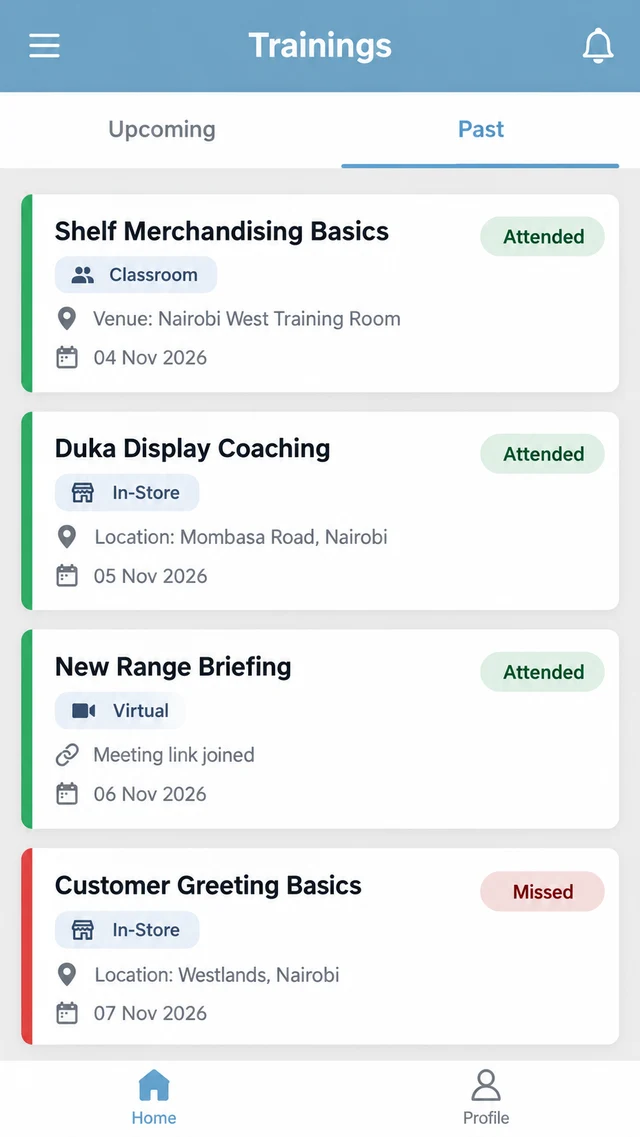
In the mobile app, the employee opens Trainings, which has an Upcoming tab and a Past tab.
Each card shows the module, a session-type badge, and the date range, and virtual sessions also show the meeting link.
In Past, a green Attended pill or a red Missed pill sits on every card, beside the venue or location note for classroom and in-store sessions.
For e-learning, a card can show Attended while still listed under Upcoming, which happens once the time spent crosses the configured threshold.
The manager sees the same record the employee sees, so there is little left to dispute afterwards.
Reading Attendance in the Portal
Once attendance is captured per session, the portal can report on it without anyone merging spreadsheets.
The Dashboard compares attendance rate against a configurable target, such as 90 percent, and labels it Below Target when it falls short.
Employee Progress lists attendance for each person, and Analytics shows each trainer's sessions conducted, students taught, and average attendance.
Suppose a training head sets a 90 percent target for a festive-season product briefing.
Two weeks before December, the Dashboard shows 78 percent and flags Below Target, and the trainer report shows which trainers have the lowest averages.
Make-up sessions can then go to the right cohorts while there is still time to run them.
How 1Channel Handles Attendance Across Session Types
1Channel's field learning platform records attendance inside the session itself, so the proof is created as the training happens instead of being collected afterwards.
The web portal and the mobile app are available in multiple languages, configured to each client's requirement.
Put the Proof of Attendance Inside the Session
See how 1Channel's sales team LMS marks attendance by session type, shows it on the employee's phone, and rolls it up into reports your training head can act on.
Explore Sales Team LMS →Points to Remember
- Attendance rules differ by session type, and the platform applies the right one automatically.
- Classroom and in-store attendance carry a photo taken at the moment of the session.
- Virtual attendance is marked by joining through the meeting link.
- E-learning attendance needs a minimum time on the content, so skimming does not count.
- Attendance targets and trainer reports show where participation is slipping while it can still be fixed.